
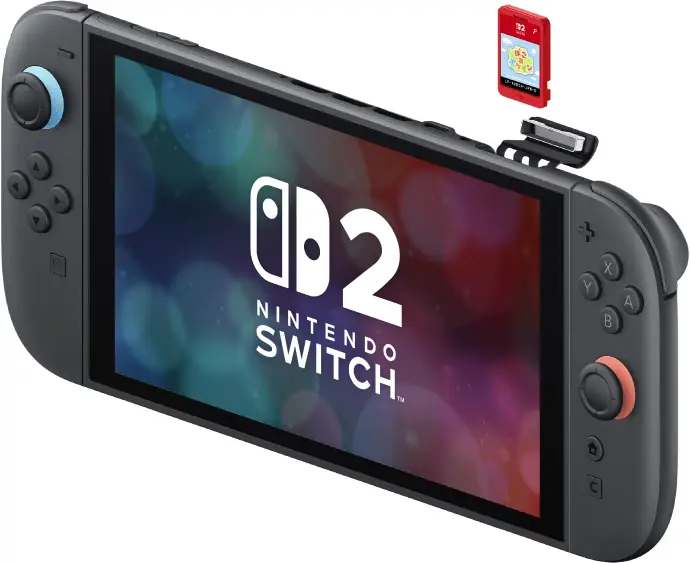
Nintendo Switch 2 game-key card explained: what it is, offline play, storage, resale, and how to spot it
Nintendo Switch 2 game-key card is a new kind of “physical” release that looks like a normal game card, but it does not contain the full game data. Instead, the card acts as your key to download the entire game to your console storage. Once it is installed, you can play offline – but you still need the card inserted, just like a traditional physical game.
Nintendo Switch 2 game-key card: what it is (and what it is not)
On Nintendo Switch 2, you will see two physical formats in stores:
- Regular game cards – the classic format, with game data on the card.
- Game-key cards – a physical card that does not include the game data. You download the full game to your console via the internet.
The key distinction is simple: if you buy a game-key card, you are buying a retail product that still requires a download and storage space. Think of it as a physical “license key” that behaves like a card, not a one-time printed code.
How game-key cards work: insert, download, play
Nintendo’s official flow is straightforward:
- Step 1: Insert the game-key card into your Nintendo Switch 2.
- Step 2: Follow the on-screen instructions to download the full game to system memory or a microSD Express card.
- Step 3: Launch the game.
Two important details matter here:
- Internet is required only the first time you launch the game. After that first launch, the game can be started without an internet connection.
- The game-key card must be inserted to play. This remains true even after the download is complete.
Do you need a Nintendo Account to use a game-key card?
No. Nintendo states that a Nintendo Account is not required to download the game data when using a game-key card. That means the “account gate” is not the point of this format – storage and distribution are.
What storage do you need, and where do you see the required size?
Because game-key cards download the entire game, free space is mandatory. Nintendo notes that the required space is:
- Indicated on the game-key card packaging, and
- Also shown on the store page for the digital version (My Nintendo Store or Nintendo eShop).
In practical terms, this format makes storage planning non-negotiable. If you are buying game-key card releases, a microSD Express card starts to feel less “optional accessory” and more “core capacity upgrade”.
Can you play offline, forever, without internet?
You can play offline after the first launch, as long as the game remains installed and the game-key card is inserted. However, “forever without internet” is a bigger promise than any modern platform can realistically make:
- Games still receive updates and patches that may require online access.
- If you delete the installed game, you will need to download it again (which obviously requires internet).
So yes, offline play is supported. But game-key cards are not the same as “everything on the cartridge, no dependencies”. They are closer to a controlled digital install with a physical key.
Can you lend, resell, or use a game-key card on another Switch 2?
Yes. Nintendo explicitly states that if you insert a game-key card into another Nintendo Switch 2, the game can be played on that console by following the same steps. In other words, the format behaves like a physical product you can move between consoles – not like a one-time code that dies after redemption.
How to spot a game-key card before you buy
Nintendo’s own pages show packaging examples and explain what information to look for. The quickest checklist is:
- A clear indication that the product is a game-key card (not a standard game card).
- A stated download requirement and the storage size needed.
- On Nintendo’s description, game-key cards also feature a key icon on the card itself.
If you are buying physical specifically to avoid downloads, this is the moment to slow down and read the box. The format is designed to look familiar at a glance.
Why Nintendo is doing this (and why collectors are split)
Game sizes keep climbing, while physical media has real capacity and production cost constraints. Game-key cards are Nintendo’s compromise: keep a retail presence and preserve resale and lending, but shift the heavy data payload to downloads.
For collectors and preservation-minded players, the tension is obvious: the value of a “physical” copy changes when the game itself lives on servers. For everyday players, the format can still be convenient – as long as you understand what you are actually buying.
FAQ
Does a game-key card contain any game data?
No. Nintendo states there is no game data saved on a game-key card, and the full game is downloaded to your console.
Do you need internet every time you play?
No. Internet is required only when launching the game for the first time. After that, the game can be started offline as long as the card is inserted.
Where is the game stored after download?
In Nintendo Switch 2 system memory or on a microSD Express card, depending on your setup and available space.
Do you need a Nintendo Account?
No. Nintendo says a Nintendo Account is not required to download the game data.
Is there a system update requirement?
Yes. Nintendo notes your Switch 2 system must be updated to version 20.1.1 or higher to play software using a game-key card.
Related reading on Noobidio
March 2026 Game Releases: Full List, Biggest Launches, Official Trailers
Official Nintendo Support: Nintendo Switch 2 Game-Key Card Overview
0 Comments
To keep discussions clean, commenting requires a Noobidio account.